How to Create a Superbill for a Cash Practice: Step-by-Step Guide
15.09.26
A superbill gives cash-pay patients the documentation they may need to seek reimbursement from their insurer. Here’s how to create one accurately, consistently, and without turning it into another manual billing task.
Running a cash practice gets you out of direct insurance billing. It does not get your patients out of wanting to use their out-of-network benefits.
That is what a superbill is for. You get paid at the visit, the patient gets a document detailed enough to submit to their insurer, and the reimbursement conversation happens between the two of them rather than landing on your front desk.
If you need the background first, our guide to what a superbill is covers the definitions, required fields, and common mistakes in detail.
This guide is the practical half. It shows you exactly how to create a superbill for a cash practice, what to collect before you start, and how to make superbills part of checkout rather than another manual admin task waiting for you at the end of the week.
Before You Create a Superbill: Understand Who Is Billing Whom
Get this straight before touching a template, because it determines what the document needs to say and what you are responsible for.
Patient receives care → patient pays your practice → you provide a superbill → patient submits it to their insurer → insurer determines reimbursement
Four things follow from that sequence:
You are not billing the insurer. The superbill is not a claim you submit, but documentation you hand to the patient.
The patient has already paid you in full. Your revenue is settled at checkout, which is the whole point of a cash practice.
The superbill exists to support the patient’s own out-of-network claim. It gives their insurer enough detail to process a request for reimbursement.
Reimbursement is never guaranteed. It depends entirely on the patient’s plan, their out-of-network benefits, their deductible, and their insurer’s rules. Some claims reimburse well, some apply only toward a deductible, and some are denied.
That last point is worth saying out loud to patients. Practices that promise reimbursement create expectations they cannot control.
Explain the process accurately to get thanked for the paperwork and blamed for nothing.
How to Create a Superbill for a Cash Practice in 6 Steps
A superbill is a structured summary of one visit, built so an insurance claims processor can read it without calling you. Work through these six steps in order, and the document assembles itself.
Step 1. Add Your Practice and Provider Information
This block establishes who provided the care and whether the insurer recognises them as a legitimate provider. Incomplete provider information is the most common reason a superbill gets rejected before anyone reviews the codes.
Include:
Practice name and full address, matching how you are registered
Phone number and email for the insurer to follow up
Rendering provider’s full name and credentials, such as DC, LMT, or LAc
Provider’s individual NPI (Type 1), which most insurers require to process an out-of-network claim
Group or organisation NPI (Type 2), if your practice has one
Tax ID or EIN
State licence number
💡A practical note on the NPI on a superbill: not every provider type in every state is eligible for one, and some insurers will not process a claim without it. If you are unsure whether your discipline qualifies, check before a patient discovers the gap at the claims stage.
Set this block up once as a saved header. It never changes between patients.
Step 2. Add the Patient Information
The insurer must match this document to a policyholder, so the details must match their records exactly rather than approximately.
Include:
Full legal name, not a preferred or shortened name
Date of birth
Home address
Phone number
Insurance company name
Member or policy ID number
Group number, where applicable
Relationship to the policyholder, and the subscriber’s details if the patient is a dependent
Collect this at intake rather than at checkout. Asking someone for their member ID while they are putting their coat on is how superbills end up sitting incomplete in a drawer.
Two small fields that cause a surprising share of rejections.
Date of service is the actual date of the appointment, not the date you produced the document. If you are issuing one superbill covering several visits, each visit needs its own dated line rather than a single date range.
Place of service is a standardised two-digit code telling the insurer where care was delivered. For most clinic-based practices, this is 11 (Office), which CMS defines as a “location, other than a hospital… where the health professional routinely provides health examinations, diagnosis, and treatment of illness or injury on an ambulatory basis.”
If you treat in a different setting, use the code matching that location rather than defaulting to 11.
Step 4. Add the Services and CPT Codes
This is the core of the document. CPT codes tell the insurer precisely what was performed, in a language their system already understands.
For each service delivered, list:
The CPT code
A short plain description of the service
The number of units, which matters for time-based codes billed in 15-minute increments
Any modifiers that apply
The fee charged for that line
Codes commonly used in chiropractic and massage settings include 98940 and 98941 for spinal manipulative treatment across different numbers of regions, 97140 for manual therapy, 97124 for massage therapy, and 99202 for new patients. Time-based codes require the treatment time to be documented in your notes, so make sure the units on the superbill match what your SOAP note actually supports.
One rule with no exceptions: the codes must reflect the visit that happened. Codes that do not match your documentation turn into a compliance problem.
Step 5. Add the Diagnosis or ICD-10 Information When Required
The relationship between the two code sets is simple:
CPT tells the insurer what you did
ICD-10 tells them why you provided the service
Insurers use the pairing to decide whether the care was medically necessary under the patient’s plan. A treatment code with no supporting diagnosis often reads as elective, and elective care is rarely reimbursed.
Use codes at the level of specificity the current code set requires. Low back pain is the classic trap here: M54.5 has not been billable since 1 October 2021, when it was replaced by M54.50, M54.51, and M54.59. Practices still using retired codes get claims returned for something that has nothing to do with the care they delivered.
An Important Qualification
Requirements vary by payer, provider type, service, and the patient’s specific plan. Some insurers require a diagnosis on every out-of-network submission, some require a referral or a prescribing physician’s details, and some accept documentation that others reject. A few will not reimburse certain disciplines at all.
Rather than assuming every insurer follows an identical superbill format, encourage patients to check their own plan’s out-of-network claim requirements before their first submission. It takes them ten minutes and saves everyone a rejected claim.
Step 6. Record the Charges, Payment and Final Details
Close the document by clarifying the financial position.
Include:
Itemised charge for each service line
Total charges for the visit
Amount the patient paid, with the payment date
Balance due, which in a cash practice is normally zero
A clear statement that payment has been received in full
Provider signature and date, or a verified electronic equivalent
That “paid in full” line matters more than it looks. It tells the insurer the patient has already borne the cost, which is precisely the basis on which they are requesting reimbursement.
Superbill Example for a Cash Practice
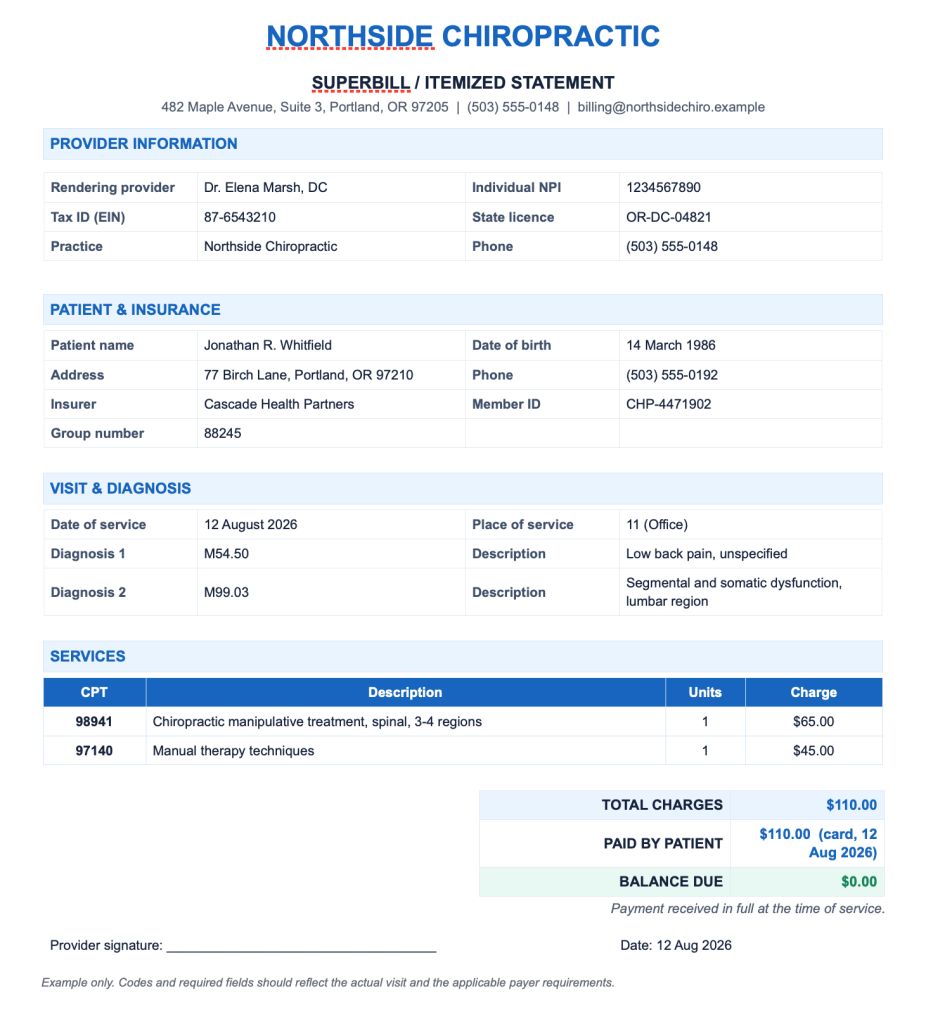
Here is what the finished document looks like for a fictional chiropractic visit.
Superbill vs Invoice: Don’t Give Patients the Wrong Document
Handing over an invoice when someone asked for a superbill wastes a fortnight and a phone call. The documents look similar, but they do entirely different jobs.
Invoice
Superbill
Purpose
Requests or confirms payment
Supports an insurance reimbursement request
Audience
The patient
The patient’s insurer
Codes
Usually none
CPT and, where required, ICD-10
Provider identifiers
Often omitted
NPI, tax ID, licence number required
Diagnosis
Not included
Usually required
Outcome
Payment recorded
Reimbursement considered
A plain invoice submitted to an insurer will be returned. It has no codes, no NPI, and no diagnosis, so there is nothing for a claims processor to act on.
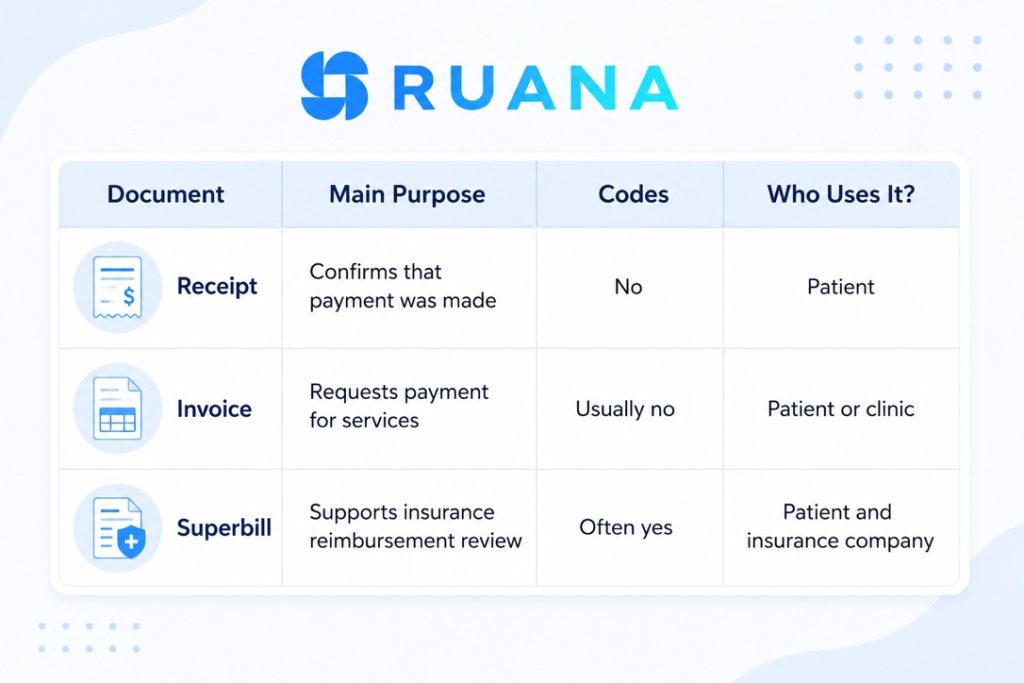
And if you wonder how these two differ from a receipt, here’s another comparison in a nutshell:
Should You Create Superbills Manually or Use Practice Management Software?
If you issue one superbill every few months, a reusable template is perfectly adequate. Build it once in Word or Google Docs, save your practice header, and fill in the rest by hand.
Once patients request them regularly, the problem changes shape. It stops being about knowing what belongs on the document and becomes about repeatedly pulling the same patient, provider, appointment, coding, and payment information together from four different places.
Manual template
Practice management software
Setup
Minutes
Configured once during onboarding
Per superbill
10 to 20 minutes of retyping
Generated from the visit record
Error risk
High, since everything is re-entered
Low, since data is pulled from existing records
Code consistency
Depends on memory
Attached to services and stored
Payment details
Looked up separately
Already on the record
Record keeping
Scattered files
Stored against the client
Best for
Occasional requests
Regular out-of-network patients
The practical difference is where the information already lives. If the appointment, the services, the codes, and the payment are all recorded in one system, producing the superbill is a step at checkout rather than a separate task.
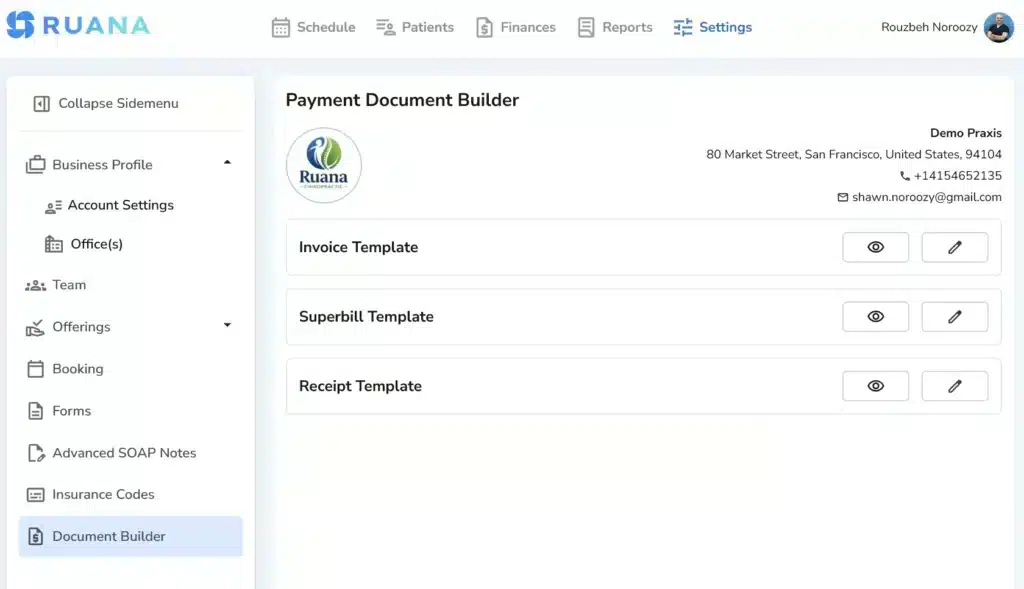
Ruana generates superbills for US practices from exactly that data, with ICD-10 codes attached to invoicing and everything tied back to the appointment and client record. Worth being precise about the boundary: Ruana supports the cash-practice model specifically, where the patient pays you and then pursues reimbursement themselves.
If you submit claims to payers directly every day, you need a different category of product.
What Happens After You Give the Patient the Superbill?
Your part is finished once the document is in their hands. Here is what follows, so you can explain it accurately when asked:
The patient receives the superbill, ideally by email at checkout rather than weeks later.
They check their insurer’s out-of-network claim requirements, which is the step most people skip and most claims fail on.
They submit the superbill along with whatever claim form or supporting documentation their insurer requires.
The insurer processes the request, typically within a few weeks.
The outcome depends on their plan. It may be partial reimbursement, credit toward an out-of-network deductible, or a denial.
Two things help more than anything else you can do. Issue the superbill promptly, because claims have submission deadlines. And be clear from the start that you are providing documentation, not guaranteeing an outcome.
Making Superbills a Routine Part of Checkout
Creating a superbill is not complicated. It is provider details, patient details, date and place of service, CPT codes, ICD-10 codes where required, and a clear record of what was charged and paid.
What makes it feel complicated is doing it in arrears, from memory, across several systems, for a patient who asked three weeks ago. Collect insurance details at intake, attach codes to your services once, and produce the document at checkout while the visit is still in front of you.
Get that habit right and superbills stop being admin. They become one of the reasons out-of-network patients choose your practice over the one down the road that tells them to sort it out themselves.
About the Authors
★★★★★4.9 · 329 Reviews
Rouzbeh NoroozyChiropractor & Co-Founder · Palmer West · UC Berkeley · 14 Years of ExperienceRouzbeh Noroozy is a chiropractor with 14 years of clinical experience and co-founder of Ruana practice management software. He completed his undergraduate studies at the University of California, Berkeley and graduated from the renowned Palmer College of Chiropractic West in California. As a practicing clinician and clinic owner, he understands firsthand the administrative challenges practices face — and which digital tools genuinely help streamline day-to-day operations.
Anastasiia NoroozyMedical Graduate & Co-Founder · 8 Years of ExperienceAnastasiia Noroozy is a medical graduate and co-founder of Ruana with 8 years of experience working directly with patients at the clinic in Cologne. She manages the day-to-day flow of the practice and knows every patient-facing process from the inside out — from intake and scheduling to follow-up care. Her hands-on clinical and operational experience directly shapes how Ruana is built to work in the real world.
Our team will review your inquiry and get back to you as soon as possible.
Privacy Settings
To provide the best experiences, we use technologies like cookies to store and/or access device information. Consenting to these technologies will allow us to process data such as browsing behavior or unique IDs on this site. Not consenting or withdrawing consent, may adversely affect certain features and functions.
Functional
Always active
The technical storage or access is strictly necessary for the legitimate purpose of enabling the use of a specific service explicitly requested by the subscriber or user, or for the sole purpose of carrying out the transmission of a communication over an electronic communications network.
Preferences
The technical storage or access is necessary for the legitimate purpose of storing preferences that are not requested by the subscriber or user.
Analytics
The technical storage or access that is used exclusively for statistical purposes.The technical storage or access that is used exclusively for anonymous statistical purposes. Without a subpoena, voluntary compliance on the part of your Internet Service Provider, or additional records from a third party, information stored or retrieved for this purpose alone cannot usually be used to identify you.
Marketing
The technical storage or access is required to create user profiles to send advertising, or to track the user on a website or across several websites for similar marketing purposes.
To provide the best experience for our practitioners, we use cookies to personalize content, analyze our traffic, and support our marketing efforts. By clicking 'Accept', you consent to our use of these technologies. You can manage your preferences at any time.
Functional
Always active
The technical storage or access is strictly necessary for the legitimate purpose of enabling the use of a specific service explicitly requested by the subscriber or user, or for the sole purpose of carrying out the transmission of a communication over an electronic communications network.
Preferences
The technical storage or access is necessary for the legitimate purpose of storing preferences that are not requested by the subscriber or user.
Analytics
The technical storage or access that is used exclusively for statistical purposes.The technical storage or access that is used exclusively for anonymous statistical purposes. Without a subpoena, voluntary compliance on the part of your Internet Service Provider, or additional records from a third party, information stored or retrieved for this purpose alone cannot usually be used to identify you.
Marketing
The technical storage or access is required to create user profiles to send advertising, or to track the user on a website or across several websites for similar marketing purposes.